
Using the throttle
Dial controls, the keypad, and the on-device settings menu.
Dial controls
The throttle works like a locomotive notch controller with momentum.
| Control | Action |
|---|---|
| Turn the dial | Select a throttle notch |
| Hold the touchscreen | Brake while held |
| Press the dial button, moving | Stop immediately: notch 0, speed 0 |
| Press the dial button, stopped | Reverse direction |
| Press the dial button, E-Stop latched | Clear the latch |
| Hold the dial button about a second | Open the settings menu |
Notches
Two detents in the same direction move one notch, like a gated notch lever: one detent up then one back down returns to the notch and changes nothing. A half-step shows as a yellow outline on the block being moved into, and is held until you complete or undo it. The detents per notch can be changed in the settings menu.
| Half-step | 4 notches | 16 notches |
|---|---|---|
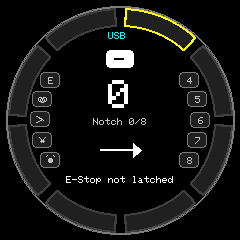 | 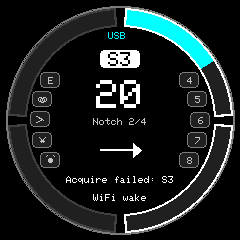 | 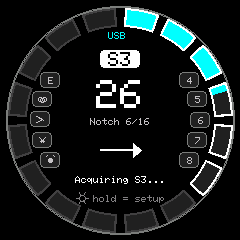 |
A block is outlined white when its notch is selected, and fills with the direction color as the
actual speed reaches it. The big number is the real speed step (0..126) and the small line
under it is the notch. The address shows - until a loco is selected.
Reverse is capped at half the notches, so the dial only reaches half speed backwards. Set
REVERSE_NOTCH_DIVISOR in config.h to 1 to give reverse the full range.
Momentum and braking
Actual speed ramps toward the selected notch at MOMENTUM_ACCEL_STEPS_PER_SEC (default 8 per
second, about 16 seconds from stop to full) and coasts down at MOMENTUM_DECEL_STEPS_PER_SEC
(default 5 per second). Both rates can be changed in the settings menu, and momentum can be
turned off there for direct notch-to-speed control.
Holding the touchscreen brakes hard. On release the ramp resumes toward the selected notch. Braking to a full stop drops the notch to 0.
Encoder decoding
The raw encoder count must move a full detent before anything is accepted, so contact chatter
never registers. A reversal within ENCODER_REVERSAL_PAUSE_MS of a detent is treated as a decoder
miscount and absorbed. A deliberate turn-back after a pause registers immediately.
Keypad
With a SparkFun Qwiic keypad attached:
| Key | Action |
|---|---|
0 to 8 | Toggle function F0 to F8 |
9 | Emergency stop |
* | Turnout mode: enter digits, press * again to flip |
# | Loco select mode: enter digits, press # again to acquire |
Selecting a new loco releases the old one and acquires the new one. Speed, direction, function and E-Stop actions acquire the loco first if needed.
Settings menu
Hold the dial button for about a second to open the menu. The home screen shows
Btn Hold = Setup as a reminder. The menu only opens with the train stopped.
| Menu | Throttle page | Server address | Text entry |
|---|---|---|---|
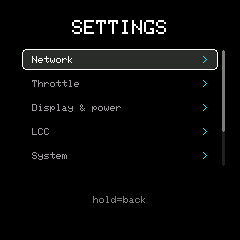 | 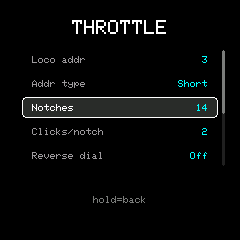 | 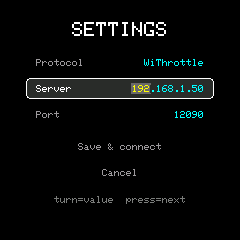 | 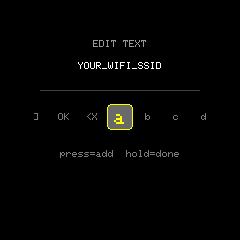 |
Turn the dial to move or to change a value, press to activate or to step to the next field, and
hold to go back. On the keypad, digits type straight into the field, # acts as a press and *
as a hold.
| Page | Settings |
|---|---|
| Network | WiFi name and password, protocol (WiThrottle or LCC), server address, port |
| Throttle | Default loco address and type, notches (4, 8, 12, 16), detents per notch, reverse dial direction, momentum, acceleration and deceleration |
| Display & power | Active and dim brightness, dim and display-off delays, power-off minutes (0 means never), sound |
| System | RFID reader on or off, reset to defaults |
Switching protocol moves the port to that protocol’s usual default. The server address is edited
octet by octet. Text fields use a character picker: turn to a character and press to add it, <X
backspaces, and OK or a hold finishes. The password is shown masked.
Choose Save & exit to write the settings and reconnect, or Discard & exit to reload what was last saved. Settings are stored in flash as one versioned record and survive a reflash. Firmware whose settings layout has changed falls back to defaults rather than loading a mismatched record.
The same values can be set over the serial console.